
Instant video transcripts in 100+ languages
99% accurate transcripts and captions from any video source, in more than 100 languages and dialects with automatic detection. Speaker identification is built in, so you always know who said what.
How our video transcription works

Import your source videos
Connect directly to your favorite storage systems, local drives, MAM or DAM, or upload your source video files. See all our integrations. Our AI system will process and analyze the video to capture speech, visuals, themes and much more. Your content is always private and is never used to train generative models.
Review your video transcript
Our transcription system includes built-in timestamping, and editing for manual correction. Select lines or paragraphs to automatically create clips, and export what you need.


Clip your best bits for social
Export your clips in their original format, or use Imaginario’s AI-powered video repurposing to resize, reframe and re-edit for social platforms.
Preview, organize and publish
Check your clips and export to your social network of choice, download as a video file, or organize into a folder for later.

We generate video transcripts for companies like


“Imaginario has been a game changer for us…
Previously we would get a transcript of the video and highlight sections to then send it to our video editor. Now we simply highlight and the snippets are created for us automatically.”
Jennifer Neal, Formula Done
Beyond tagging: human-level understanding of every shot
Tags tell you a video has a person in it. Imaginario understands who is speaking, what they say, what is on screen, the mood and how the story unfolds. Every video gets this treatment automatically, in more than 100 languages.
For Enterprise customers, we can create custom models based on your footage and map outputs to your own vocabulary or editorial taxonomy.
See what else you can do with Imaginario
Transcripts that know who is speaking and who is on screen
Speaker identification works at the transcript level, so every line is labeled with the person who said it. Interviews, panels and multi-camera shoots stay readable without any manual tagging.
Facial analysis and people recognition go a step further. Imaginario connects faces to moments across your entire library, so you can find every appearance of a person even when they never say a word.
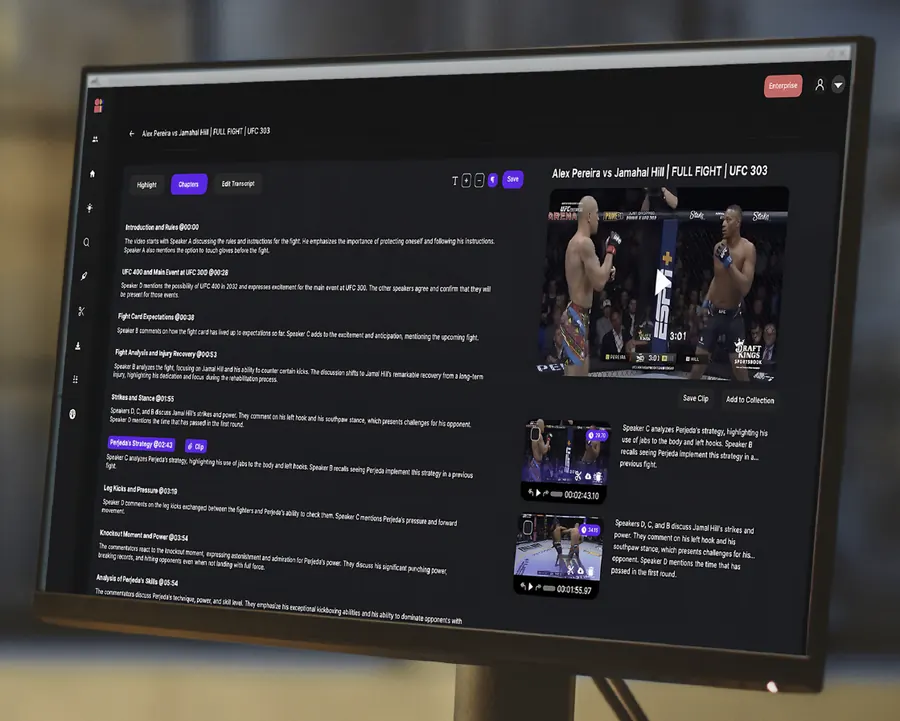
Highlight a line, get a clip
Transcripts in Imaginario are not a static document. With Highlight to Edit you select the lines you want, and Imaginario cuts the matching video for you. It is the fastest way to turn interviews, webinars and podcasts into finished clips.
Chapters, topic detection and speech search all work from the same transcript, so you can jump to the section you need, pull every mention of a topic, and send your cuts to Adobe Premiere and DaVinci Resolve timelines or export for Avid.
Frequently asked questions
Is there a limit to how many transcripts I can generate?
There is no monthly minutes cap. Imaginario is built for entire video libraries, and every video you add is transcribed automatically as part of indexing. Plans are sized to the volume of footage you bring, with volume discounts depending on contract size. You can see more details on our pricing page.
What languages are supported?
Imaginario supports more than 100 languages and dialects with automatic language detection. Transcripts, captions and speech search all work across every supported language, so global teams can search and clip in the language the footage was shot in.
Can I generate transcripts from a YouTube video?
Yes, and not only YouTube. You can transcribe any video from a link, a direct upload, or dozens of integrations, including cloud storage such as AWS S3, Google Drive, Dropbox, Box, Backblaze, Wasabi and Frame.io, plus MAM and DAM systems. See the full list on our integrations page.
Are your transcripts checked by humans?
No, all transcripts are generated by our video AI system. They are created in real time with a high level of accuracy, though the AI may miss some words such as names, slang, or speech with strong accents. You can correct any line in the transcript viewer.
Can I manually correct the AI transcripts?
Yes! Switch to editing mode in the transcript viewer and fix any line in place. You can also highlight the lines you want and turn them straight into clips with Highlight to Edit.
Can I export the transcripts?
Yes! Copy any selection, or export the full transcript as plain text or an SRT file. SRT files double as caption files, so the same transcript powers subtitles and captions wherever your video is published.
If you want to export the entire transcript, it is available as plain text or an SRT file.

Get started today
Enjoy thousands of minutes of AI analysis, transcriptions, search, and auto-captions, plus much more.