
B-roll is the supporting footage an editor (or content marketer) cuts over the main shot of a video. The main shot, with the person on camera and the audio that carries the story, is the A-roll. Everything laid over it to cover an edit, show what is being described or set the scene is the b-roll.
Most answers to the question what is b-roll stop there, then move on to how to shoot it.
This post does the same for the definition, the origin, the A-roll comparison and eight b-roll examples, and then covers what no top result does: where b-roll comes from now that you can generate it, how to find usable b-roll in the hours of footage your team already owns, and how to make money from it (!).
What is b-roll?

B-roll is secondary footage cut into a video to support the main shot, normally a narrator, a voice over or speaker in front of a camera. It covers edits, illustrates what is being said and adds context without carrying the main story itself.
Take an interview about a new university library. The librarian speaks to camera for four minutes. The editor keeps her voice running and cuts to students in the stacks, a hand pulling a book off a shelf and a wide shot of the reading room at dusk. Those shots are the b-roll. They give the viewer something to look at, hide the jump cuts in the interview and make the library real.
That is the whole b-roll definition. In plain terms, the b-roll meaning is this: it is what you see while you listen to something else.
Why is it called b-roll?
Curious fact: The origins of the name comes from film editing.
On 16mm film the splices between shots showed on screen, so editors put odd-numbered shots on one roll of negative, the A-roll, and even-numbered shots on a second roll, the B-roll, with black leader filling the gaps. The two rolls were printed one after the other onto the same stock, a method called checkerboard printing, which hid the joins and made dissolves possible.

Broadcast news kept the words when it moved to tape in the 1980s: the A deck carried the interview, the B deck supplied the silent cutaways. The two rolls are long gone. The b-roll meaning stayed.
A-roll vs b-roll
The A-roll vs b-roll split is about which track leads. A-roll carries the story and the sync audio. B-roll supports it and usually runs under the A-roll audio.

| A-roll | B-roll | |
|---|---|---|
| Purpose | Carries the story: interview, presenter, dialogue | Supports it: covers edits, illustrates, sets the scene |
| Audio | Sync audio from the shot is used | Audio is usually muted or dropped under the A-roll track |
| Who is on screen | The speaker or main subject | Places, hands, crowds, products, the thing being talked about |
| Typical shot length | 10 seconds to several minutes | 2 to 6 seconds per shot |
| News example | Reporter’s stand-up and interview | Exterior of the courthouse, traffic, the crowd |
| Corporate example | CEO on camera for the annual results | Factory floor, the product, employees at work |
| Sports example | Post-game interview with the coach | Training session, fans arriving, the empty stadium |
B-roll examples by type
Editors and marketers tend to reach for the same eight kinds of b-roll footage. Adobe and Vimeo both cover how to shoot them. Here is one example of each, drawn from the kinds of teams that use them most.
- Establishing shots. A wide shot of a city skyline before a broadcaster’s evening news segment on housing.
- Cutaways. During a university interview about enrollment, a shot of a student’s hand filling in a form.
- Process shots. A nonprofit’s kitchen volunteers packing meals, shown while the director talks about scale.
- Detail shots. A close-up of a championship ring during a sports documentary.
- Crowd and reaction shots. Fans in the stands reacting to a late goal, cut into a highlights package.
- Archive footage. A 1990s campus shot inside an alumni video, pulled from the university’s own library.
- Aerial shots. A drone pass over a flooded river in a nonprofit’s disaster response appeal.
- Product shots. A slow push-in on a new camera body in a product launch video.

These b-roll examples share one feature. None of them needs the subject to talk, which is exactly why they are easy to reuse.
How b-roll works on social media
On social, b-roll does the job the voice used to do. 74% of Facebook video is watched without sound, and Facebook’s own research, cited by Kapwing, found that 65% of viewers who make it past three seconds watch at least ten. 52% of Instagram users prefer video under a minute. With no sound and three seconds to hold someone, the cutaway is the hook, and the person talking is the thing you cut away from.
Marketing teams use b-roll in three shapes:
- The talking-head Reel with cutaways. A founder or presenter on camera, with a new shot every two to three seconds: the product, the office, a customer using it, the event floor. The audio carries the argument. The b-roll keeps the thumb still.
- The faceless montage with text on screen. A hotel’s TikTok of the pool, the breakfast, the view from the room, with the offer in captions. No one speaks. It is b-roll with the A-roll removed, which is why these are the easiest posts to make from an archive and the hardest to make without one.
- The still-image carousel. Product shots, event photos and behind-the-scenes stills sequenced on Instagram or LinkedIn to carry a caption. It is b-roll by another name, and it comes from the same shoots.

For a social team, the b-roll library is every event shoot, product session and campaign the brand has ever paid for. The person posting daily is the one who most needs to find a shot without asking the video editor where it is. That is the case for search built for marketing teams, and for publishing straight to Instagram Reels, TikTok and YouTube Shorts once the shot is found.
Where does b-roll come from? Shoot it, buy stock, generate it or reuse your archive
There are four sources of b-roll footage now, and most guides only compare the first two. Prices are typical ranges published by the vendors in 2026, not quotes.
| Shoot it | Buy stock | Generate it | Reuse your archive | |
|---|---|---|---|---|
| Typical cost | Crew, travel and a day of production | $39 to $395 per HD clip, or roughly $20 to $200 a month on a subscription. Free b-roll footage exists but is limited and widely used | $20 to $250 a month on a consumer plan, or 5 to 60 cents per second of output through an API, multiplied by the number of attempts | Already paid for |
| Rights | Yours, with releases | Licensed, with restrictions on use and territory | Usable under the tool’s terms. Stock sites require an AI label, and purely generated clips have thin copyright protection | Usually yours, with talent and location releases already on file |
| Brand fit | Exact | Generic. The same clip appears in competitors’ videos | Close after enough prompts, but never your people, your product or your building | Your people, your products, your locations |
| Clip length | Any | Usually 5 to 60 seconds | About 8 seconds per generation on most tools, longer by chaining extensions | Any |
| Turnaround | Days to weeks | Minutes, if the right clip exists | Minutes per attempt, and usually several attempts | Minutes, if you can find it with the right system |
Sources for the ranges:
Pond5 pricing (clips from $39, subscription $199 a month)
Storyblocks (plans from $252 a year, pay-per-clip ranges)
CloudZero’s Veo 3 pricing guide (Google AI Pro at $19.99, Ultra from $99.99, API from 5 cents per second, 8 seconds per generation).
The fourth column has a condition attached, and it is the real problem. Most teams already own hours of unused b-roll. A corporate video team that shoots one day a month ends up with roughly 100 hours of rushes a year, of which a few minutes made it into finished videos. That is an illustrative example, but the pattern holds in every library Imaginario has indexed. The footage exists. Nobody can find it, because a folder named Shoot_March_Final tells you nothing about what is inside, the metadata was never written, and the one colleague who remembers which drive holds the drone pass over the harbor is the living index of your library. When they are on holiday, or they leave, the archive goes dark.
So when finding a moment is expensive, teams reuse the same well-known moments, because those are the ones they can locate. Or they buy stock of a generic office, or prompt one, when they have their own office on a drive somewhere. Imaginario removes the condition. You do not need to know where a shot sits, which folder it is in, what it was tagged, or who shot it. You describe what you need in plain words, a nurse at a bedside, rain on a window, the CEO on stage in 2023, and it comes back as a timestamped shot from wherever it lives, across every drive, MAM and DAM you have connected. The index is built from the footage itself, not from the labels someone did or did not add, so last year’s rushes are as findable as this morning’s.
Generated b-roll: where it fits and where it does not

Generated b-roll is footage made from a text or image prompt rather than a camera. The main sources are Google’s Veo, available inside the Gemini app, OpenAI’s Sora inside ChatGPT, Runway, Kling, and Higgsfield, which skips the prompt and applies camera-move presets such as a crash zoom or a crane shot to a still image, drawing on several of the same models underneath. The stock libraries are adding generators to their own catalogs too. Adobe Stock now accepts generated clips as long as they carry a “Created using generative AI tools” label, so some of what you buy as stock is generated too.
Where it works: establishing shots of places you cannot send a crew, abstract and texture shots, product-free illustrations of a concept, and placeholders in a rough cut while the real footage is found. It is cheap per attempt and fast.
Where it does not: anything that has to be authentic and true. Three limits matter for b-roll in particular.
- Prompting is the work. A usable 8 second clip often takes several generations to get the framing, motion and continuity right, and every attempt is billed. Chaining clips into a longer shot multiplies that.
- Duration and context. Most tools produce roughly 8 seconds per generation. That covers a cutaway but not a process shot that has to run under 40 seconds of narration, and a generated shot cannot show your building, your product or your staff.
- Audience trust. In Animoto’s 2026 State of Video report, 83% of consumers said they had watched a video they suspected was AI-generated, 36% said a generated video would lower their view of the brand, and 68% said real people make a video feel authentic. For a hospital, a university or a news brand that is a cost, not a saving.
The practical rule most editors land on: generate what nobody expects to be real, and use real footage for everything else. Which brings the question back to the archive.
How do you find b-roll in footage you already have in minutes, not days?

This is the part that changed in the last two years. Video search that works at shot level, rather than at file level, means you can describe a shot in plain words and get back timecodes. Here is a worked example of what is b-roll footage search in practice. The brief: a two-minute recruitment video for a hospital’s nursing program, and the editor needs b-roll of nurses at work with no one speaking to camera.
- Describe the shot in plain words. Type “nurse checking a monitor at a patient’s bedside” into search. Results come back as timestamped shots across every connected drive, DAM and MAM, not as a list of files to open.
- Filter to clips with no dialogue. Keep only shots where nobody is speaking. This removes interview footage in one step and leaves the cover shots.
- Narrow by people or location. Filter to a ward, a building or a named member of staff who has signed a release, so every result is cleared for use.
- Check results by timecode. Scrub the candidate shots in the preview, in and out points already marked. A 2 to 6 second shot is enough for most cuts.
- Export selects to your favorite editing tool, including Premiere Pro. Send the selected shots as a sequence with timecodes into Premiere Pro, DaVinci Resolve or Avid, and the editor starts from a rough cut rather than from a folder.
This is how search footage by describing the shot works in Imaginario. It indexes what is shown, said and heard in every shot, and works on top of the storage, MAM and DAM a team already uses rather than replacing them, across 32 integrations. At Warner Bros. Discovery, the teams spend 70% less time searching and clipping for social media compilations and highlights. The published figure is about clipping for social, but the same search is what surfaces b-roll for a longer edit. There is more on AI search for editors and post teams if you cut from a growing library every week.
How do you keep b-roll findable?

Footage gets found again only if it is described. There are two ways to do that.
If your team tags by hand, log at least these five fields at ingest, per clip rather than per folder:
- Location, as specific as the building or room.
- Subject, meaning what is in frame and what is happening.
- Shot size, from wide to close-up, and camera movement.
- Season and time of day, because a summer exterior does not cut into a winter story.
- Rights, including which releases are on file and any restrictions.
Hand tagging works until the library outgrows the person doing it. AI indexing captures most of these automatically for every shot: objects, locations, actions, who is on screen, whether anyone is speaking, the shot type and the mood. Rights still need a human, but the rest is logged the moment a file lands in storage, so nobody has to go back and tag last year’s rushes. For marketing teams, that is the difference between buying off brand generic stock and being able to find on-brand b-roll for marketing videos they already paid to shoot.
Can you make money from b-roll you already own?

Yes, and production companies and creators are doing it two ways. Both start with the same step: finding and packaging the footage into collections that a buyer can evaluate, with releases on file and no dialogue to clear.
Stock and cinematic licensing. Artgrid, Adobe Stock, Pond5 (owned by Shutterstock), Filmsupply and Storyblocks all take contributor footage, and Wirestock distributes one upload to several of them. Returns vary a lot by platform. In Fstoppers’ January 2025 case study, one filmmaker earned about $8,960 from 1,401 clips on Artgrid in 2024, against $539 from 746 clips on Adobe Stock. Two practical notes from the same piece: curated sites pay more per clip than the big microstock libraries, and Artgrid will not accept horizontal clips cropped to vertical, so a collection shot both ways is worth more.
AI training data licensing. Since 2025, brokers have been buying raw, unpublished footage on behalf of AI labs. Bloomberg reported rates of $1 to $4 per minute for unused creator footage, more for 4K, drone and unusual material, with Google, OpenAI and Moonvalley among the buyers. The brokers include Troveo, which says it holds over 8 million hours of opted-in video and audio, Protege Media (which absorbed Calliope Networks in December 2024), which Luminate reports has more than 100 media partners including broadcasters, producers and sports leagues on non-perpetual licenses, and Wirestock’s AI lab program. Variety has covered how creators are structuring these deals.
Either way, the hard part is not the upload. It is knowing what you have: which shots are clean, which have a release, which are the same location in four seasons. That is a search problem before it is a sales problem, and it is the same search described above.
How Imaginario helps you find, package and license what you already own
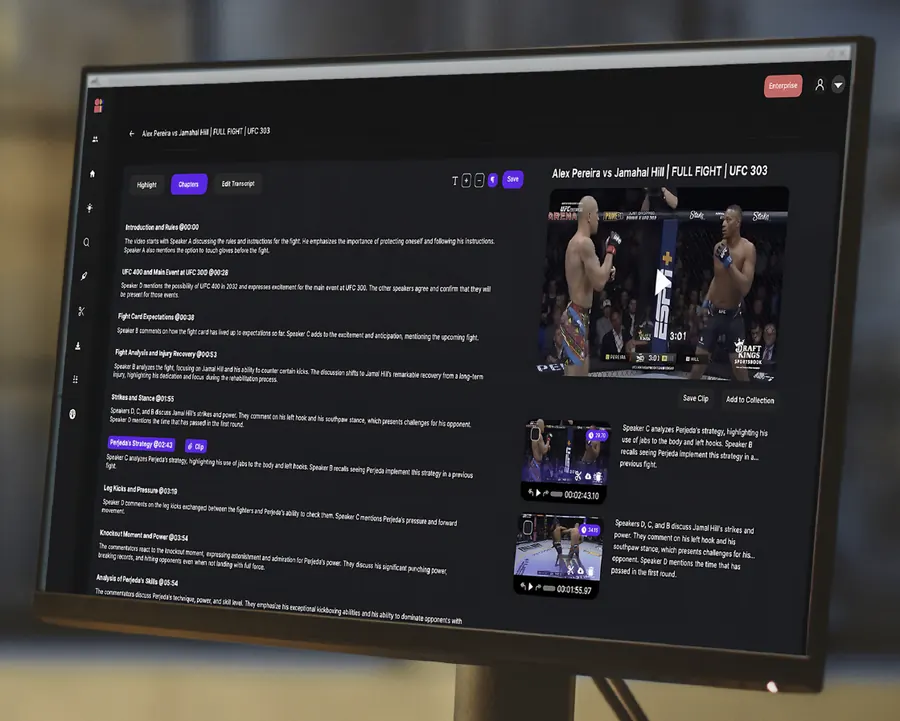
Everything above comes back to one question: can you see what is in your library? Imaginario is built for that question. It is a video intelligence platform that indexes every shot of every file, across thousands of hours and tens of thousands of raw shots, and it searches by meaning rather than by file name or tag. It runs on top of the storage, MAM and DAM you already use, across 32 integrations, so nothing moves and nothing is re-tagged by hand.
For b-roll specifically, four kinds of search matter:
- Visual search finds a shot from a plain-language description: a drone pass over a coastline at dusk, a hand on a factory lever, an empty stadium. Results are timestamped shots, not files.
- People search finds every second a named person appears, which is how you separate cleared talent from everyone else before you package a collection.
- Dialogue search works the other way for b-roll: filter to shots where nobody is speaking, or find the one line of narration a cutaway needs to sit under.
- Audio search finds sound effects, ambient sound and music by description: a cheering crowd, rain on a window, a tense silence. Clean atmos and sound effects are a licensable asset in their own right, and most libraries have never cataloged them.
From there, StoryLab assembles the selects into a sequence, so a collection for a stock library or a data buyer can be reviewed as a rough cut rather than a folder, and exported with timecodes to Premiere Pro, DaVinci Resolve or Avid. Metadata is written back to your own fields, which is what a licensing partner asks for first.
Two customers show the two halves. Warner Bros. Discovery EMEA cut time spent searching and clipping by 70% across Cartoon Network and Boomerang. Cineverse used visual search to go through a two-hour film in half an hour and surfaced content it did not know it had, which is the first step before any of it can be licensed.
If your team is sitting on a library it cannot fully see and monetize, we should talk.
Read next: more post-production terms on Wide Lens.
FAQ
What is a b-roll?
B-roll is supporting footage cut over the main shot of a video. It covers edits and shows what the speaker is describing, while the A-roll carries the story and the audio.
What does b-roll mean?
The b-roll meaning comes from film editing, where shots were split between an A-roll and a B-roll of negative. Today it means any secondary footage that runs under the main audio track.
What is a b-roll in film?
In film, b-roll is the cutaway and establishing footage an editor uses between or over the primary shots. It hides cuts, bridges scenes and gives the audience context the main shot cannot.
What is b-roll content?
B-roll content is the footage a team collects or reuses to support talking-head and presenter videos. It includes establishing shots, cutaways, process shots, detail shots, crowds, archive, aerials and product shots.
Why do they call it b-roll?
The name comes from the two rolls of film negative, A and B, used in editing to hide splices and create dissolves. Broadcast news kept the terms when tape replaced film.
Where can I get b-roll footage?
Four places: shoot it, license it from a stock library such as Pond5, Storyblocks or Artgrid, generate it with a tool such as Veo or Sora, or search the footage your team already owns. The archive is usually the cheapest and the best brand fit, if you can find the shot.
Does b-roll apply to photos?
Not strictly. B-roll is video, but editors use still photos the same way, as cutaways over an interview or narration, often with a slow push-in. Archive stills are common b-roll in documentaries and news. On social media, a still-image carousel on Instagram or LinkedIn is b-roll by another name.
What is an example of a b-roll video?
A hospital recruitment video where the nurse’s interview is the A-roll and the shots of her on the ward, checking a monitor and talking to a patient, are the b-roll. The viewer hears the interview and sees the work.